Wow, week one of Fractal Tech bootcamp is already done. A true 60+ hour work week! 11 more weeks to go.
Mon-Fri are structured like this:
- 9am arrival (soft deadline, just can’t miss the 10am lecture!)
- 10am lecture
- 2pm lecture
- 5pm journaling/other lecture e.g. emotional management, system design
- 7pm post EOD inside Discord with PRs and give feedback.
Saturdays are system design reviews and demo days, which I’ll elaborate on in the Daily Log section. We are also assigned a lot of reading throughout the week—both technical and general—on Mimir.
Very pleased that presentation and communication skills, and writing in particular, are such key parts of program. My daily posting to Twitter/X and Substack Notes helped me process each day and write this weekly blog post. Why write so much? Why write at all, actually? Well, software engineering is similar to writing; I always thought they shared a certain charming logic. But in the near future, there may literally be no distinction. Even world-class AI engineers like Karpathy are speaking mostly English now to write code. But even removing this newfangled reason, it’s good to have a public record. Build in public, they always say. Writing helps your future self a lot, whether in formal interviews or in general conversations about your projects. You know how some people sound super eloquent? Chances are they wrote about whatever it is they’re talking about, likely in a book. Or at the very least an article.
But for me, two words we learned this week are my reasons for writing. Autotelic and autodidactic. Self-ending (its own end) and self-learning (or self-teaching). I started writing a little over a year ago, which transformed my life. Writing is its own reward, its own teacher.
As a subset of writing, blogging is a different challenge. I’ve not blogged frequently before, so I’m experimenting with the format. I want blogs like this to still be enjoyable to AI curious lay people, even as it explores more technical detail. And of course, I don’t want blogging to be draining for me. It should retain its autotelic nature. Not sure how to strike that balance each week, but I’ll try.
Reflection
What was it like to build Tic Tac Toe from scratch? Meaning, no code generation from AI, but with AI as a tutor.
Really difficult. I gave near-daily feedback “anonymously” that I was overwhelmed (I put my name in the feedback notes haha). See this pie chart? Yeah, that 8.3% is all me. I’m bottom of the class for the first time in my life, which surprisingly doesn’t feel that bad. Now I can go around saying “you know, it’s actually like soooo smart to be the dumbest person in the room!!” I’m giving my 18-year-old self a hug, though. She would be totally crushed. But really, falling behind is fine. As long you’re really trying and raising your hand for help, it will work out. There’s always an escape hatch. Besides, my outcome is rather expected. Nearly everyone else in the 14-person cohort either already worked in software engineering or had a Computer Science background (unusual for this bootcamp, actually. I’ve seen more of a mix in the past). While I struggled with the basics, other students implemented 3D Tic Tac Toe, Ultimate Tic Tac Toe, Python machine learning projects etc.
To put my prior skills into perspective, I entered the bootcamp with truly the bare minimum credentials. I passed their evaluation and finished their Essentials (aka not Optimal) precoursework. On day 1, I showed up knowing basic Typescript (~3 hours worth) and no use at all of Claude Code or openAI Codex. Didn’t even have them installed! One point in my favor was some familiarity with Git and Github, having spent a whole day in January troubleshooting my messed up branching and merging doing Fullstackopen exercises. Also, I had a bit of scripting experience in Python, R, and an intermediate knowledge of SQL, from my ~9 years in the tech/tech-adjacent business world.
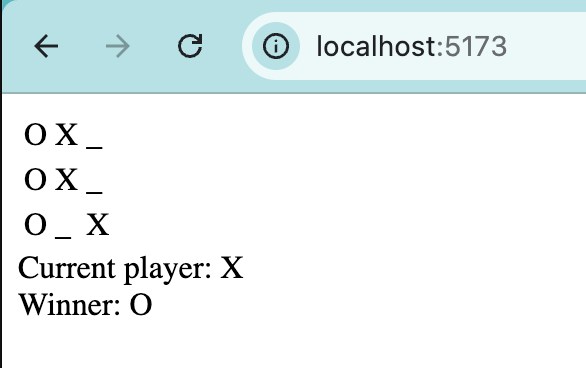
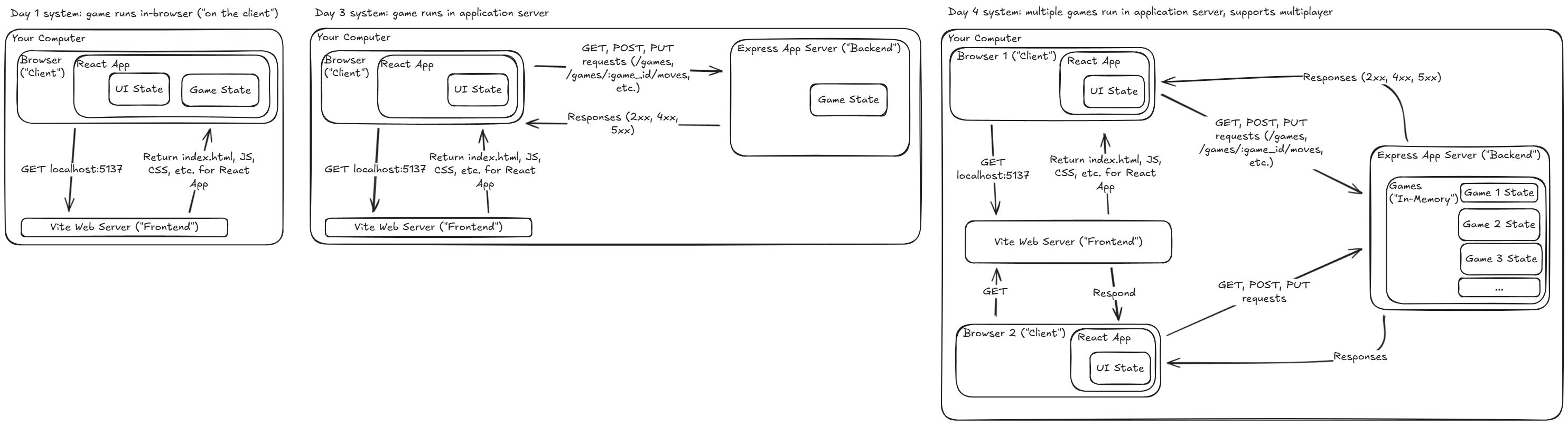
So, I went from being able to sorta script to building my first real piece of software from scratch in a few days. I went from 1) a skeleton file to 2) a game that only worked on my computer to 3) a game that two or more people could play from different computers, live on the internet. I’d summarize this experience as: building software is really about building systems, not writing code.
| 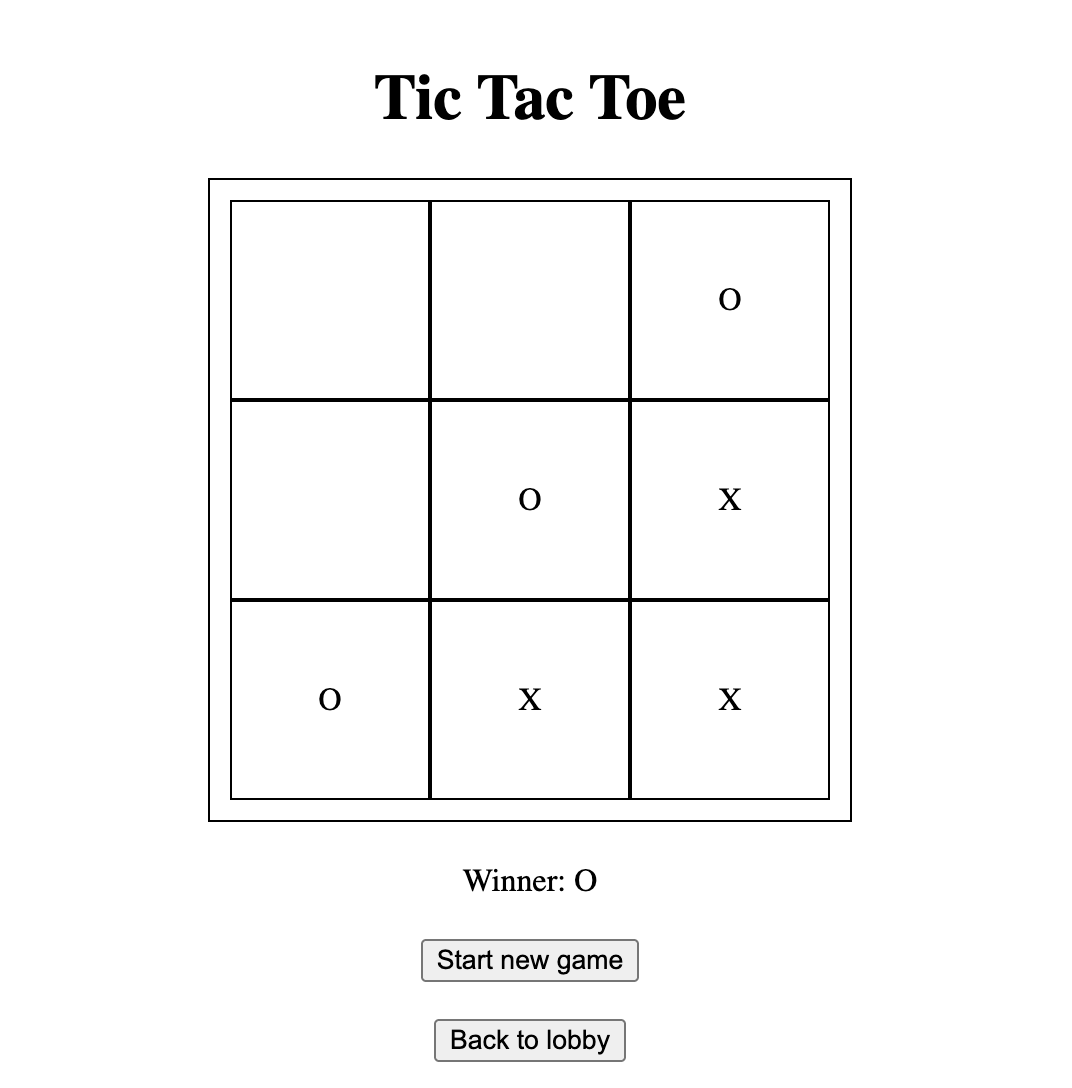 |
| Day 2 - Basic (Client-side, local only) | Day 5 - Multi-game (Client and server-side, deployed live) |
Each day wasn’t really about Tic Tac Toe - it was about understanding layers: game logic (state vs operations), then the UI/interface, then a server so that data can persist, then IDs so that multiple games can exist, then polling (or websockets, if you’re not bottom of the class) so players can see each other’s moves in real-time, then deployment so the whole world can access it. Ultimately, software is a stack of decisions about separation and responsibility (who lives where? how do they talk to something else that lives somewhere else?).
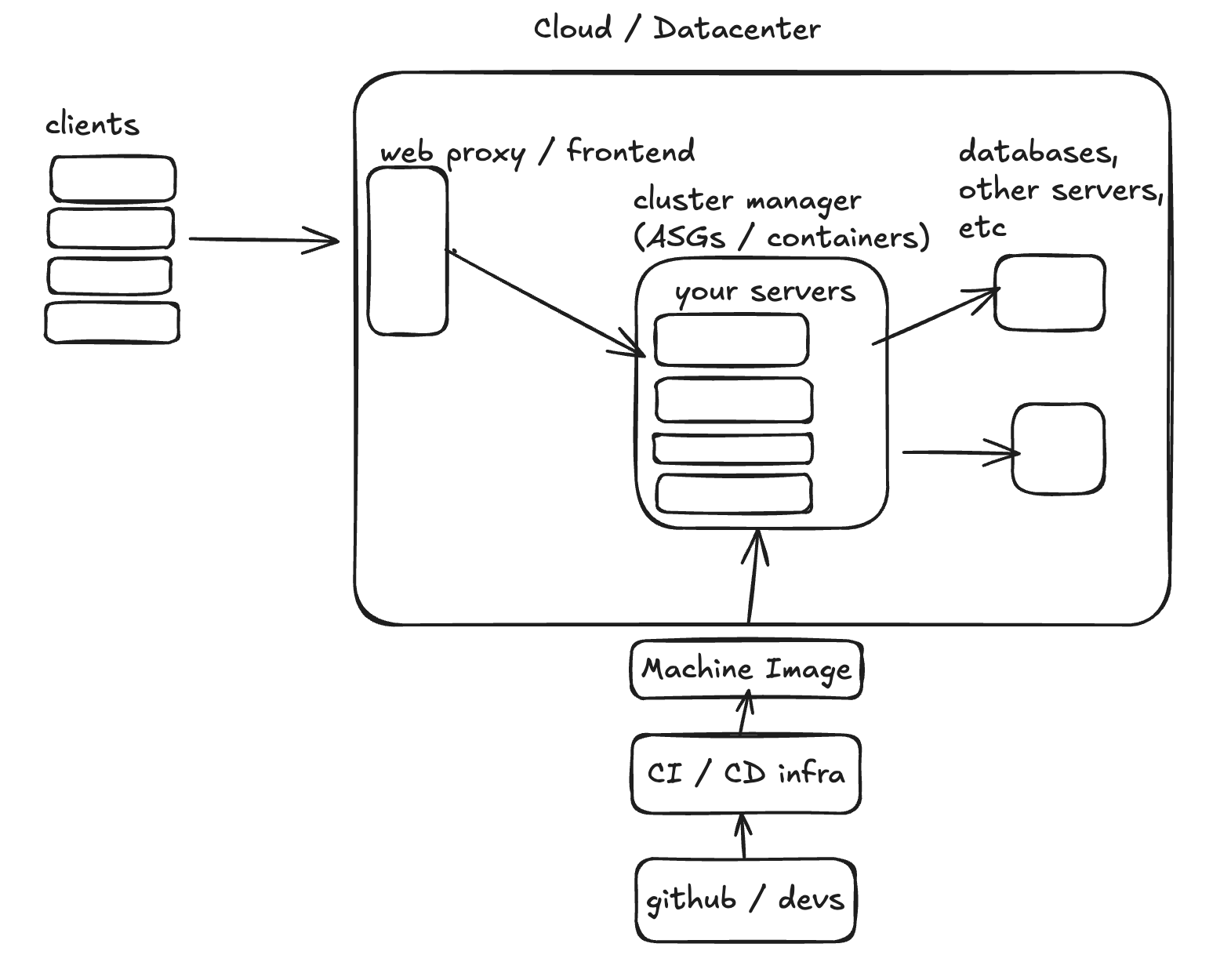
At this point, it’s good practice to share my live deployment link. But I will resist on the extremely off chance that my link goes viral, which will crash Render and get me booted off their platform all because I used polling instead of websockets (the appropriate solution for scale).
A few other key takeaways below before the daily logs begin.
Learning about Learning
- A lot of “learn to code online” sites like Scrimba have sandboxes aka their own embedded IDEs that run code for you in the browser…to really learn, you need to get into the real engineering tools like VS Code ASAP. Doing Fullstackopen exercises in VS Code and pushing them to Github was absolutely essential for me
- The other problem with online coding schools is their handholding - they often isolate problems so much that you lose sight of the overall architecture
- One instructor watched me struggle to learn for about 15min; I pet his sweet dog Parsley for some emotional support. What got me out of a React rut was his suggestion on making a piece of toy code that represented the real problem, solve it, and then solve the real problem
Key Concepts
- There is no limit to what you can do
- Medium is no longer code, it is thinking and language itself
- Junior engineer is dead; long live the “junior senior engineer”
- System design is more important than ever, even/especially for juniors
- Premature optimization kills everything!
Random
- CSS is now Turing complete?
- You must kill Claude when it gets trapped in “unconfident Claude mode” :‘(
Tech Stack
- Terminal: I really like it! By simply using git commands, you look like one of those fake hackers on bad TV shows
- IDE: Visual Studio Code - amazing with extensions/plugins like Postman
- Github: My Tic Tac Toe repo
- AI: Claude Code Opus 4.5/4.6 and openAI Codex 5.2 (for tutoring only!) -Runtime: Bun (not npm!)
- Languages: Typescript (superset of Javascript), HTML, CSS
- Frontend: React, Vite
- Backend: Express, vite-express
- Testing: supertest, vitest
- Linting: ESLint
- Live Deployment: Render
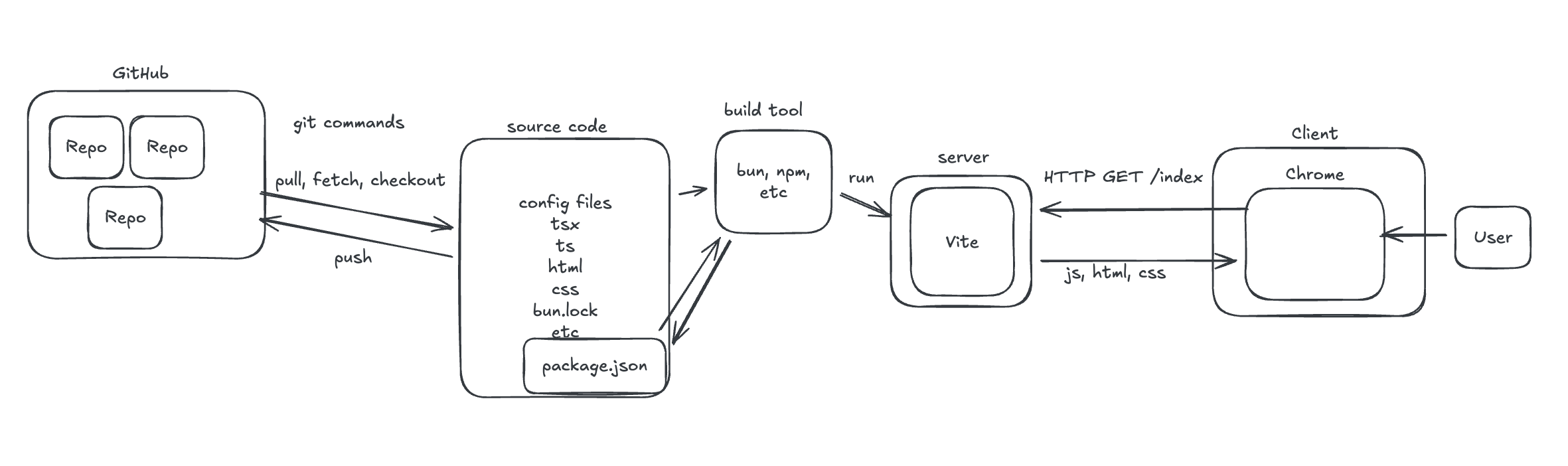
- System Diagrams: Pen and paper is still OP. But we also like Excalidraw, draw.io, Mermaid etc around here
Daily Logs
My daily posts on Substack and Twitter were fully written by me. But for the PR logs below, I let Claude Code read my git commit history and write the summaries, with me as the editor. It’s probably not that impressive in the grand scheme of things, but man, to me it’s another demonstration of why CCC (Claude Code is Cracked).
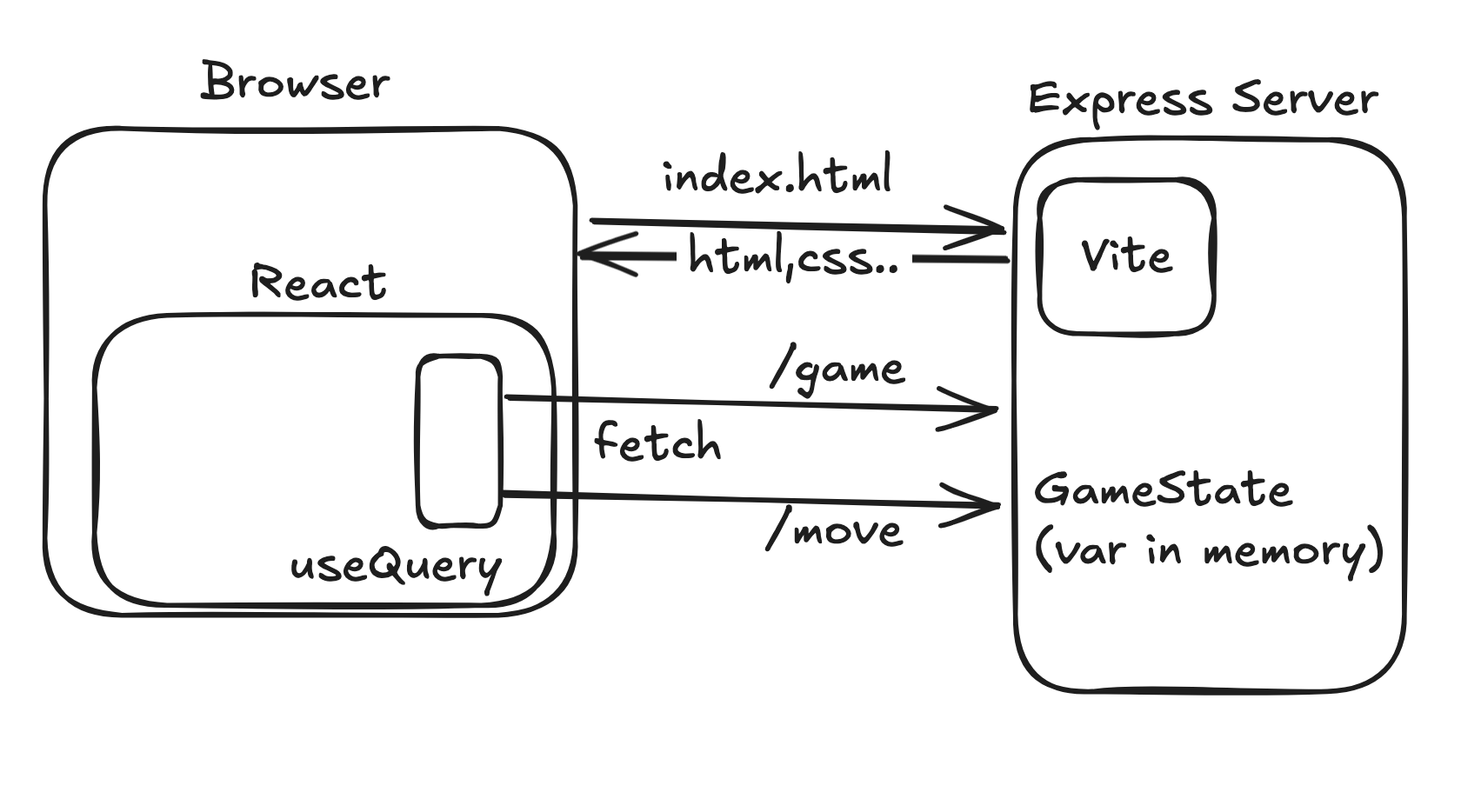
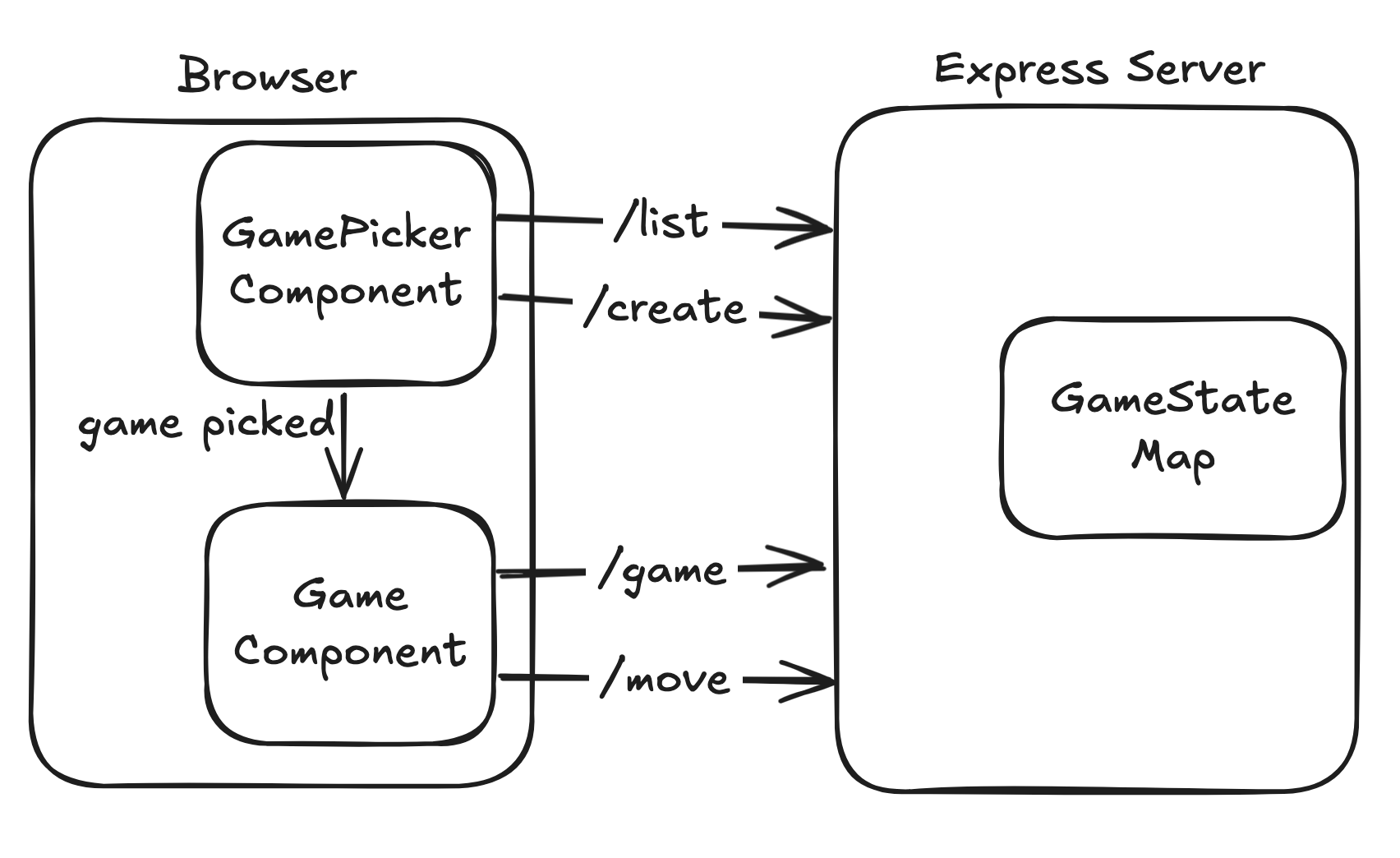
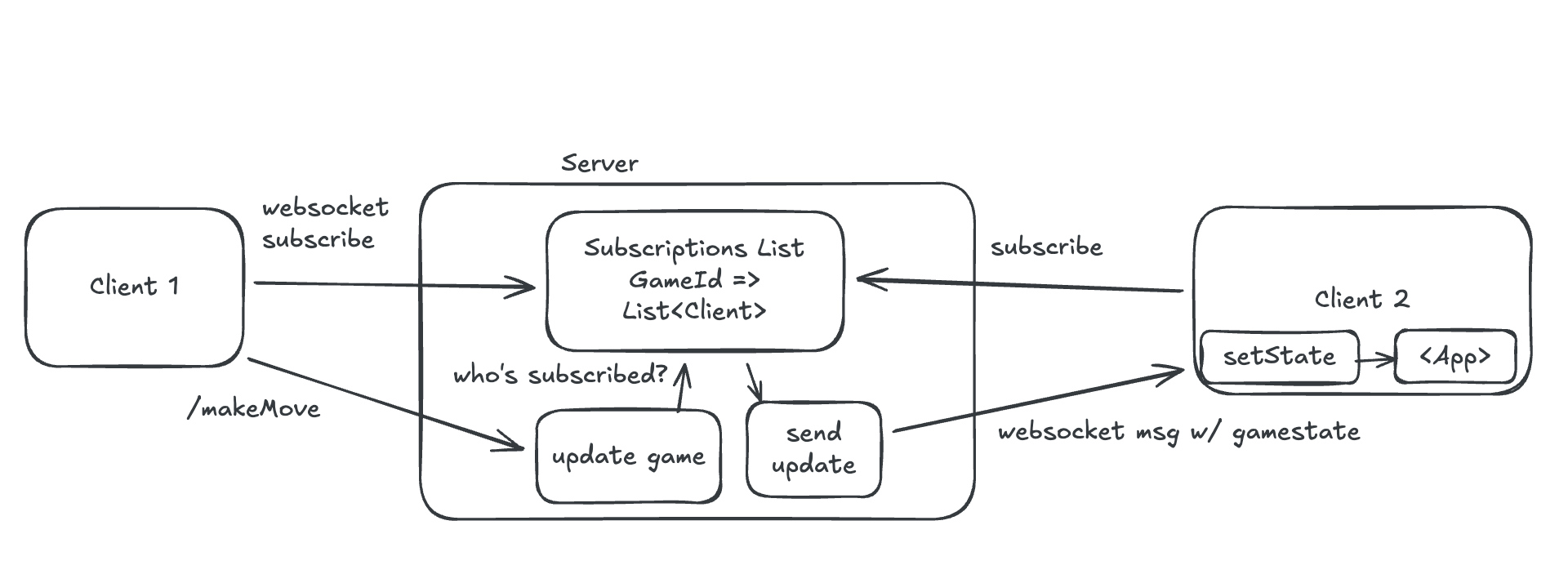
Also, the system design diagrams were made by our instructors. Once I make my own specific ones aka shows the suboptimal ways I implemented the game, I’ll replace them/add them alongside the official ones.
Day 1 - Using Claude Code to create your personal site
Daily Posts: Substack | Twitter
This is fully explained in last week’s first blog post :)
Day 2 - Basic (Client-side only)
Daily Posts: Substack | Twitter
Core Game logic + Basic UI Big Build Day. Went from raw game logic to a fully playable tic-tac-toe in the browser. Passed 25 tests for the core logic, then built the React UI layer on top — board rendering, click handling, and winner announcement.
- PR #1 add-readme — Added README
- PR #2 implement-tic-tac-toe — Implemented makeMove and getWinner functions, passing all 25 tests
- PR #3 display-game — Built the UI: HTML table skeleton, click-to-play interactivity (setState on clicks), and winner display with conditional rendering
Day 3 - Styling and Server-Side
Daily Posts: Substack | Twitter
Refactor, Styling, and Server day. Why move to a server? So that two players can eventually play from different computers!
Cleaned up the codebase, made it look reasonable on mobile, then added a real backend. By end of day, the game had a server with REST API endpoints and the frontend was reading/writing game state through it.
- PR #4 refactor — Refactored win checks to use array-of-tuples + loop, extracted a reusable Cell component (replacing 9 hardcoded elements), added scratch abilities in Terminal thanks to Codex
- PR #5 styling — Mobile-first Flexbox styling, conditional rendering cleanup, “Start new game” button
- PR #6 server — Set up vite-express, built /api/game and /api/move endpoints (tested with Postman), wired up fetch() + useEffect on the frontend for data persistence across refreshes/tabs
Day 4 - Multi-game with Test Driven Development (TDD)
Daily Posts: Substack | Twitter
Test-driven development day. Wrote server integration tests first (red), then iterated on the implementation until they all went green. This drove the addition of multi-game support via game IDs.
- PR #7 tdd — Installed supertest, wrote createGame integration tests (both initially failing — drove the need for game ID implementation)
- PR #8 tdd-iterative — Made all 5 tests pass: createGame, getGameList, and makeMove endpoint tests. Fixed socket hang up issue with NODE_ENV test config.
Day 5 - Real-time and Live Deployment
Daily Posts: Substack | Twitter
Lobby, Polling, Deploy, and Bug Fixes — Another big day. Built the lobby so multiple games can coexist, added polling for near-real-time multiplayer, deployed to Render, then spent time squashing bugs — interval churn from useRef misuse, polling that never mounted, stale closures, and hardcoded URLs breaking in production.
- PR #9 lobby — Built a full lobby system: conditional rendering with two useStates, game list display, “Back to Lobby” button, “New Game” adding to list without refresh, styling
- PR #10 polling-deploy — Added “real-time” updates via polling (useEffect intervals), made app deploy-ready for Render (env var PORT, static middleware for dist, excluded tests)
- PR #11 improve/gamestate-ui — Fixed several bugs: relative URLs for deploy, Render start script, useRef interval churn, polling not mounting due to early return, stale dist files, lobby styling updates
Day 6 - Demo Day
Daily Posts: Substack | Twitter
System diagrams and demo/presentation prep day. Simplified the polling logic for clarity, generated architectural diagrams (mermaid) with AI assistance (Codex + Claude), and prepared clean versions of the code to walk through. Claude is better than Codex at creating diagrams, but Codex gives more technically-worded suggestions.
My demo slides - 3 min is just enough to touch on the “useEffect is evil (kinda)” slide
- PR #12 demo — Cleaned up App.tsx for demo (saved pre-demo copy), refactored lobby polling to use gameState.id dependency instead of empty dep array + useRef guard, added mermaid diagrams (from Codex/Claude), created alternative App_nouseRef refactor
- Final commit: removed useRef from the no-useRef variant to fix a TS error
Future Tic Tac Toe Considerations
Braindump for what I can improve, other ideas etc
Near Term
- Add websockets
Long Term
- More styling
- Try other formats like Ultimate Tic Tac Toe, 3D Tic Tac Toe