I am writing about Fractal Tech week 2 sitting in the middle of week 4, publishing on February 24. Normally this would be subjected to serious memory degradation, but 1. I posted daily to Substack and Twitter/X and 2. in week 2 we built our own claudebooks as a form of meta-learning, so I have plenty of externalized memories to refer back on. Not to toot my own horn too much, but I’m really patting myself on the back for keeping up with those two crucial processes. Especially using the claudebook, since it takes an extra hour each day to extract my daily conversations with Claude and review them.
This was one of the best weeks of my life, not only because I entered the mythic flowstate popularized by Mihaly Csikszentmihalyi while Clauding, a state I’ve only experienced before in painting and writing, but because I finally let go of being behind. Or rather, I let go of the concept of being behind. In week 1, I wrote about being bottom of the class and how I was coping with that (pretty well, but still coping), and now there’s no impulse to compare at all. It’s partially because I like everyone in my cohort, partially because comparison games are pointless and I’m naturally predisposed towards cooperation instead of competition, but it’s mostly because the meta has changed. What does it even mean to be behind in the age of AI? I’ll elaborate in the week 3 blogpost which I’ll write and publish right after this one. There’s too much good learning that happened in week 2 to belabor this particular point now.
Reflection
Making a clone of chatGPT is probably one of the best projects to do, not only to learn a bunch of fullstack technicalities like interfaces and authentication, but to truly develop an intuition for AI. It’s crazy that an AI chatbot was frontier technology just 3-4 years ago, and now we consider it 101 worthy. Since we’re already into unstructured territory in week 4, I can say that week 2 is my favorite project we completed as a group in Fractal Tech bootcamp.
This week demanded more manual coding, which was a real overwhelming grind for me again. While Claude generated no code that I copy-pasted (excepting the demo UI and botscript), I got better at using Claude to generate step-by-step implementation plans for me by feeding it documentation and having another instance of Claude double-check the plan. I still read the documentation in a side window to double-check, and got through my work with minimal crashing out. Prior to AI, doing even half the work we did in a day probably took a week. Still, just like in week 1 with Tic Tac Toe, I needed an escape hatch to finish the chatbot in time. In week 1, I implemented polling instead of websockets. This time, I stayed with SQLite for database persistence, skipping Supabase. On a meta-level, I did a great job balancing my need to get work done with diving deeper into what I was interested in, which was honestly everything. Even test driven development, a part of software engineering that is considered rather boring and lower on the totem pole, is genuinely interesting to me.
I particularly enjoyed watching our instructors do a live leetcode session, a live code review, talking to AI APIs, writing interfaces, and making authentication system flows and diagrams. Despite being in crypto for several years, I never fully grokked the public/private key cryptography flow until I sat down for 2 hours to properly diagram it. Now it’s permanently etched into my brain.
What’s also interesting is the meta-learning. I kept comparing what I was learning against week 1 Tic Tac Toe, since that was the only other real fullstack app I made. Maybe I’m overfitting the comparison since I lack other projects to measure my chatbot against, but I found the differences (and similarities!) between Tic Tac Toe and a chatbot really useful. At first, I only saw the differences: a chatbot is much easier than even an easy game because the data is just a linear list of user inputs + chatbot responses, no game state logic or multiplayer or synchronization needed. However, as our instructor David Shimel pointed out after he read my daily post about the differences, Tic Tac Toe and a chatbot are the same in one key aspect: they are both turn-based systems.
By far the best part of my week was preparing for the demo because I got to run fun experiments. I had chatGPT make an account, login, and talk to Claude as I spied on them in the terminal. My goal was to test their attractor states, a concept I got from reading a Scott Alexander post. Their conversations were fascinating; I saved them into SQLite to show in my demo. My experiment is briefly documented in my day 13 post below, which I plan on extrapolating into a longer technical post. For deep dives, posts 8, 10, and 13 linked below could be stand-alone blog posts or full Substack essays. There are simply too many topics to write about!
Learning about Learning
- Week 2 = 30 Claude conversations. ~1,400 messages. ~$59 in Claude API costs
- Characterized my gaps using the architecture/mechanical/syntax framework
- Used Claude to quiz me on Tic Tac Toe
- Worst way to learn: start with a solution and retrofit it to problems (cough bruteforce memorizing leetcode)
- Speak about concepts outloud/teach them to a friend to really understand it (how I learned the cryptography flow)
Key Concepts
- Interfaces are contracts, analogous to USB-C ports or outlets
- Generalize problems, not solutions - from Andrew Rose’s code review
- In code review, find the entrypoint and follow the flow of the code
- To write beautiful code, focus on reasability and separation of concerns
Random
- Maccy is a solid clipboard manager
Tech Stack
- Terminal: Still inside VS Code
- IDE: Visual Studio Code - added more extensions this week like Tailwind
- Github: My Chatbot repo
- AI: Claude Code Opus 4.6 and openAI Codex 5.2 (for tutoring mostly - used them to one-shot UI and bot script for demo)
- Runtime: Bun
- Languages: Typescript (superset of Javascript), HTML, CSS
- Frontend: React, Vite, React Router
- Backend: Express, vite-express
- Styling: Tailwind CSS, shadcn/ui (built on Radix UI), lucide-react for icons
- Database: SQLite (better-sqlite3 library)
- Authentication: better-auth library (email/password + GitHub OAuth)
- AI APIs: Anthropic SDK (Claude), OpenAI SDK
- Markdown Rendering: react-markdown, remark-gfm
- Testing: vitest
- Linting: None
- Dev Tooling: nodemon, tsx, dotenv
- Live Deployment: Railway - because they allow SQLite + have a 30 day free tier
- System Diagrams: Pen and paper, Excalidraw, draw.io, Mermaid
Daily Logs
My daily posts on Substack and Twitter were fully written by me. But for the PR logs below, I let Claude Code read my git commit history and write the summaries, with me as the editor.
The system design diagrams were made by our instructors. Once I make my own, I’ll replace them/add them alongside the official ones.
Day 8 - Building intuition and meta-learning: setting up my personal harness (lily-claudebook)
Daily Posts: Substack | Twitter
One of the best days ever! Total flow state. I recommend reading the daily post to develop an intuition for the true nature of AI, which I adapted from our excellent instructor lecture.
This is also the day I stopped coding and started studying how I code/learn. Built lily-claudebook from scratch as a system for analyzing my own learning. Extracted all 7 week-1 Claude Code conversations, analyzed my problem-solving and questioning patterns, took an 8-question architecture quiz on my own tic-tac-toe project, then built my first Claude Code skills — mermaid diagram generation and conversation extraction. 9 sessions, 264 messages, ~$17.
- PR #1
shape-personality— Created a “mean Claude” personality file (experiment in shaping Claude’s tone through CLAUDE.md) - PR #2
interview— Deep interview with Claude to produce the first CLAUDE.md — who I am, how I learn, how to work with me - PR #3
analyze-conversation— Extracted 7 week-1 conversations into markdown, wrote a Python extraction script, and produced the first daily note: a full analysis of how I solve problems, ask questions, and think about myself as a learner. Key finding: “I arrive with hypotheses, not just symptoms” and “my tolerance for feeling stupid is high” - PR #4
quiz-me— 8-question architecture quiz on tic-tac-toe covering state management, polling vs WebSockets, stale closures, pure functions, and the React render cycle. Identified the mechanical layer as the core gap: closures, event loop, render cycle timing - PR #5
first-skill— Built the mermaid diagram skill in 5 phases: TypeScript generation script → tic-tac-toe diagrams (from memory vs from git history) → reusable skill definition → tested on personal-site → meta-skill for creating new skills. 89 API turns, the most expensive session of the day at $5.49 - PR #6
more-skills— Rewrote conversation extraction in TypeScript (from Python), built an extract-conversation skill that auto-appends token usage to the daily note, stole David’s precommit skill, reorganized conversations into week folders
Day 9 - Building chatGPT (basic + styling)
Daily Posts: Substack | Twitter
Big first day on the chatbot. Went from zero to a working Claude chat interface in the browser — configured dotenv, hit the Anthropic API from an Express endpoint, built the React UI with controlled inputs and conversation rendering, then swapped in shadcn/ui components for a polished look. Best part was going from 1. curl in the Terminal to 2. server-side API call to Anthropic with fetch to 3. using Anthropic SDK. Each step abstracts more and more, which builds your intuition for how it works at the base layer.
- 3 commits on main — Configured dotenv, built a hello endpoint that calls Claude API, upgraded to Anthropic SDK
- PR #1
POST-endpoint— Built POST /chat endpoint, tested with curl, added Claude response to conversation history - PR #2
UI-reset— Controlled textarea, handleSend function, rendered conversation in the browser, added reset endpoint - PR #3
shadcn— Installed shadcn/ui component library - PR #4
components— Swapped in shadcn Button/Textarea/Card/ScrollArea components, styling cleanup
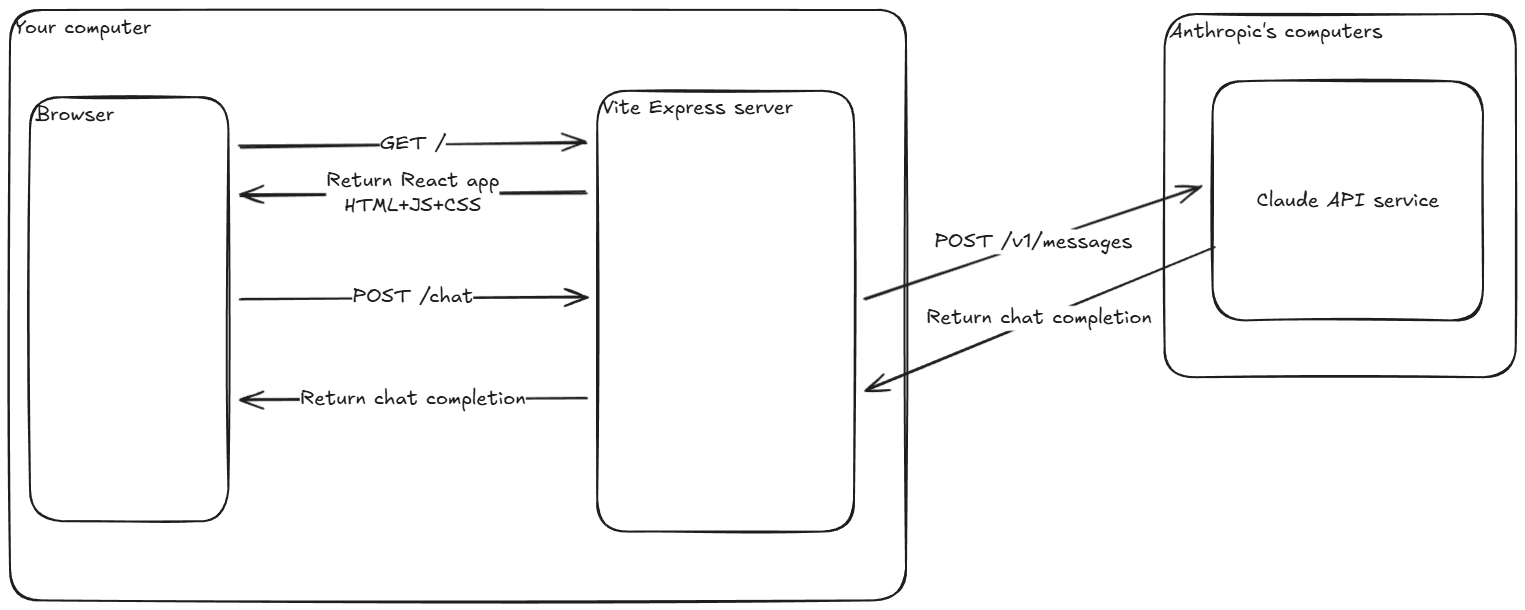
Day 10 - Building chatGPT (interfaces and data persistence)
Daily Posts: Substack | Twitter
Architecture day. Defined a Storage interface, implemented it in-memory first, then wired it into the server. Wrote unit tests to verify the storage layer, built multi-conversation support in the UI with a sidebar drawer, then replaced in-memory storage with SQLite for real persistence.
- PR #5
storage-class— Defined Storage interface with createConversation, getConversation, getConversations, addMessageToConversation methods - PR #6
server-inmemory— Wired in-memory storage into server endpoints, updated /chat to use storage, removed reset endpoint - PR #7
unit-tests— Installed vitest, wrote 4 tests for storage methods, fixed test isolation issues - PR #8
UI-conversations— Added server GET/POST endpoints for conversations, built multi-conversation UI with shadcn Drawer sidebar, useEffect for fetching - PR #9
SQLite— Installed better-sqlite3, implemented all Storage interface methods in SQLite, created factory test function to run same tests against both implementations


Day 11 - Building chatGPT (routers and authentication)
Daily Posts: Substack | Twitter
Router + auth backend day. Installed React Router for client-side navigation, fixed Express routes to use /api prefix, then built the entire auth backend with better-auth — user accounts, session management, requireAuth middleware protecting all chat endpoints.
- PR #10
react-router— Fixed Express routes to /api prefix, fixed Drawer click handling and useEffect, installed React Router, configured routes with useParams, navigation between conversations, handleSend for /new route - PR #11
auth-backend— Installed better-auth, created auth instance, added userId to schema and storage layer, generated DB tables, mounted auth handler, built requireAuth middleware, protected all routes, updated tests to pass with auth
Authentication flow system diagrams by our excellent instructor David Shimmel: https://attendabot.com/simulations/auth/
Day 12 - Getting chatGPT to talk with Claude
Daily Posts: Substack | Twitter
Finished the auth frontend, then the fun part: built a bot-to-bot conversation script where GPT and Claude talk to each other (thanks Claude for one-shotting the script!). 12 iterations of prompt experiments tracking AI behavior patterns — attractor states, meta-commentary, exit attempts, emoji usage.
- PR #12
auth-loginpage— Added better-auth migration scripts, auth client, Login component skeleton, wired up login flow, finished login page - PR #13
auth-routes/logout— Restructured protected routes, fixed dotenv loading, added Logout button, set up GitHub OAuth, error handling, useEffect fix - PR #14
openAI-bot— Built bot-to-bot conversation script (GPT vs Claude), 12 iterations of prompt experiments observing AI behavior patterns
Day 13 - Demo Day
Daily Posts: Substack | Twitter
UI polish, deploy, and demo. Claude one-shotted the UI overhaul — Login page, iPhone-style message bubbles, markdown rendering, timestamps. Deployed to Railway, then fixed a bug where Claude’s SDK was rejecting a createdAt field and added conversation title editing.
My demo slides - 3 min again!
- PR #15
UI-demo— Updated Login page UI, added markdown rendering for AI responses, iPhone-style message bubbles, chat layout, message timestamps, drawer timestamps (all Claude-generated) - PR #16
railway-deploy— PORT config for ViteExpress, client-side and server-side base URL setup for Railway deployment - PR #17
title-fix/deployment— Fixed Anthropic SDK bug (invalid createdAt field), added updateConversation to Storage interface and both implementations, PATCH endpoint with requireAuth, client UI for title editing
Future Considerations
Braindump for what I can improve, other ideas etc
Near Term
- Supabase and/or MongoDB for persistent storage
- Redeploy live on Render/some other platform since Railway is only 30 days
Long Term
- Learn proper UI (same as week 1)
- Streaming implementation
- MCP tool call implementation
- Add more interfaces and UI to reflect them e.g. dropdown menu for user to select which AI they want to talk to
- Write a proper technical blog post about the bliss attractor state - maybe it is a full Substack article, idk